

The Personalize tab on the My Info page lists personalization keys. Personalization keys allow developers to create portlet input fields. For example, a developer creates a weather portlet where users enter a postal code or select from a list of postal codes. This allows the user to automatically see the weather for the area they have specified.
Click Personalize to show all keys and their values for all the portlets to which you have access. Only keys that are used by portlets that you have access to are shown. See Figure 2-1.
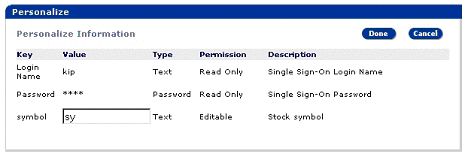
The fields shown in the Personalize window are:
Key – the key that is used by the portlets to look for personalized input values for different users based on who is using the portlet.
Value – you can set this to show different values. This field cannot be edited if the Permission field is “Read Only.”
Type – indicates the type of the value field:
Text – any string type data.
Password – password type value. This displays as asterisks when entered.
Select – you can specify a set of items to show in a drop-down list. The list of values must be separated by commas in the text box.
Permission – this indicates whether you can change the value of the field.
Description – a text description of the key.
| Copyright © 2004. Sybase Inc. All rights reserved. |
|
|
