

Chapter 3 Working with Repository Documents
Locking documents
There are various ways to lock a document in the current branch.
- Right-click a document, folder, or root node and select the Lock command. This command is available only if you have the Lock versions right and the appropriate permissions on the documents.
- Use the Lock tool on the property sheet of a:
- document (Versions tab)
- branch (Members tab – multiselection available)
- configuration (Members tab – multiselection available)
- Using the List of Locks (see Managing document locks in the List of Locks)
- Before check out using the option in the Check Out Document and Check Out Project windows (see Checking Documents Out From the Repository)
You must have the Lock permission to freeze a document version.
 To lock a document version from the repository browser:
- Right-click a document node in the repository browser and select Lock to open the Lock Document dialog box.
- Enter an appropriate comment in the Comment box.
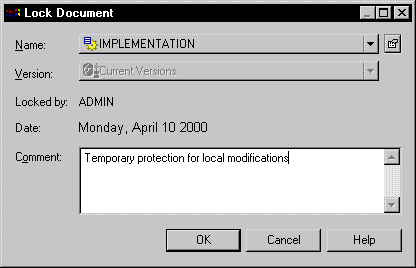
- Click OK to lock the version. Other users will not be able to check in changes to the version until you unlock it.
|
Copyright (C) 2008. Sybase Inc. All rights reserved.
|
|