

Chapter 3 Working with Repository Documents
The Check In Options window allows you to specify how differences between your local copy of a document and the repository version are resolved during check in.
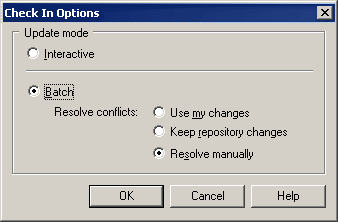
You can arrive at this window in any of the following ways:
You can choose either of the following check in modes in this window:
| Check in Mode | Description |
|---|---|
| Interactive | [default] Opens the Check In Model window (see Using the Check In Model window) before the check in, to allow you to compare the local and repository versions of a model document, and to review and approve or reject differences for check in. |
| Batch | Automates check in of documents. If you select this mode, you must specify one of the following sub-modes for resolving conflicts:
You can set this mode as the default by selecting Tools→General Options, clicking Repository in the left-hand pane, and selecting the Batch update check box. |
| Copyright (C) 2008. Sybase Inc. All rights reserved. |
| |