

Chapter 4 Managing Profiles
These tools are only available when the form is a dialog box:
| Tool | Name |
|---|---|

|
Adds an edit field below the selected item in the tree. |

|
Adds a multi-line edit field below the selected item in the tree. |

|
Adds a combo box below the selected item in the tree. |

|
Adds a list box below the selected item in the tree. |

|
Adds a check box below the selected item in the tree. |
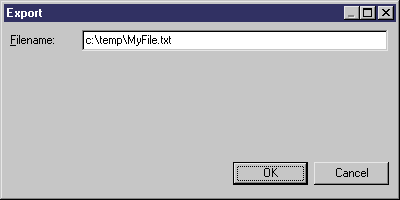
In this example, you create a new dialog box with an edit field. This dialog box is displayed when you select the Export command in the contextual menu of the extended object metaclass. You use this dialog box to type the path where the extended object should be exported.
To create this dialog box form you have to:
Sub %Method%(obj)
   ' Exports an object in a file

   ' Create a dialog to input the export file name
   Dim dlg
   Set dlg = obj.CreateCustomDialog("MyProfile.Export")
   If not dlg is Nothing Then

      ' Initialize filename control
      dlg.SetValue "Filename", "c:\temp\MyFile.txt"

      ' Show dialog
      If dlg.ShowDialog() Then

         ' Retrieve customer value for filename control
         Dim filename
         filename = dlg.GetValue("Filename")

         ' Process the export algorithm...
         Output "Exporting object " + obj.Name + " to file " + filename

      End If

      ' Free dialog object
      dlg.Delete
      Set dlg = Nothing

   End If

End Sub
SetValue initializes the edit field, and GetValue uses the path defined in the dialog box.
| Copyright (C) 2006. Sybase Inc. All rights reserved. |
| |