

 The M-Business tab displays only if you have purchased
the Unwired Accelerator (UA) license. Contact your Sybase sales
representative or customer service about obtaining a license for
UA.
The M-Business tab displays only if you have purchased
the Unwired Accelerator (UA) license. Contact your Sybase sales
representative or customer service about obtaining a license for
UA.
Use the M-Business tab to access public and group channels, as well as create your own personal channels. A channel lets you view a Web page offline. For example, you can view Web pages on your PDA or SmartPhone when you do not have a network or Internet connection. You can specify how much content you want, such as a page, or a page and all its links, and choose how you want to update that content on your computer.
 Creating personal channels
Log in to Portal Interface with your member name and password. See “Accessing portal interface through mobile applications”.
Click MyInfo at the top of the page, then select the M-Business tab.
The M-Business Channel window displays. This lists personal channels, public channels, and group channels. You can edit, add, or delete personal channels, but not public or group channels.
Click Create Personal Channel.
The Edit Personal Channel window displays.
Figure 2-2: Edit Personal Channel window
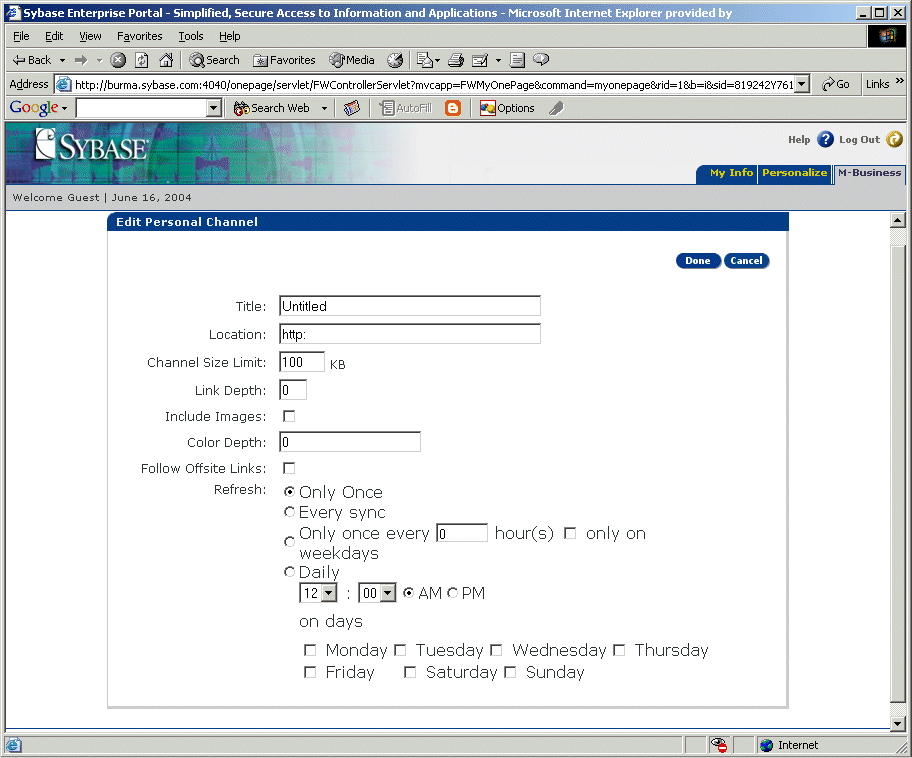
Enter:
Title – name of your new channel. This field is required.
Location – URL of the channel content. This field is required.
Channel Size Limit (KB) – maximum size in kilobytes (KB) that the entire channel can consume.
Link Depth – how many levels of hypertext links to move through when downloading channel content to the device.
Include Images – include images from the Web page.
Color Depth – the number of colors that can be displayed on a pixel.
Follow Offsite Links – allow following of offsite links.
Refresh – select from these options:
Only Once
Every sync – refreshes every time you sync your PDA with your PC.
Only Once Every __hours – select the “only on” box to specify only on weekdays.
Daily – choose the time from the drop-down list and select either AM or PM.
On Days – select the box next to the day you want to refresh.
Click Done to save the channel.
Click Cancel to return to the originating window without saving the channel.
| Copyright © 2004. Sybase Inc. All rights reserved. |
|
|
