

Enterprise Portal allows Portal Interface users to share pages with other valid, registered Portal Interface users. Only user-created pages can be shared; that is, catalog pages and default pages cannot be shared.
This feature requires the use of e-mail to send the shared page links.
When sharing user pages:
Users can share user pages across portal installations that use the same portal database. Users are grouped under resources. Each resource corresponds to a portal. Portals can represent companies, divisions, departments, and so on. Recipients select the resource from which they want to receive pages from a drop-down list, before they preview and accept a shared page.
You cannot share pages that contain secure portlets; that is, portlets with content captured from secure Web sites.
You cannot share default pages.
When you send a page to someone who has never logged in to Portal Interface, the recipient must first self-register, then accept or decline the shared page.
 Users cannot self-register through the shared page accept
or decline function.
Users cannot self-register through the shared page accept
or decline function.
If the recipient does not have the appropriate role to see a portlet on the shared page, that portlet is not visible to the recipient.
 Sending a page
Select the page to share and click “Share Page” on the secondary navigation control in Portal Interface.
Enter:
To – the e-mail address of the recipient of the shared page.
From – your e-mail address displays by default.
Subject – filled in automatically and is read-only.
Message – enter any message to send to the recipient along with the page.
Click Send.
In the confirmation window, click OK.
Accepting a shared page
When you receive an e-mail message indicating that another user is sharing a page with you, click the link provided in the e-mail message for the shared page.
The portal displays. In the Sign In & Save Share Page, enter:
Member name – your user name.
Password – your password.
Resource – select the resource from the drop-down list.
Figure 3-3: Accepting a shared page
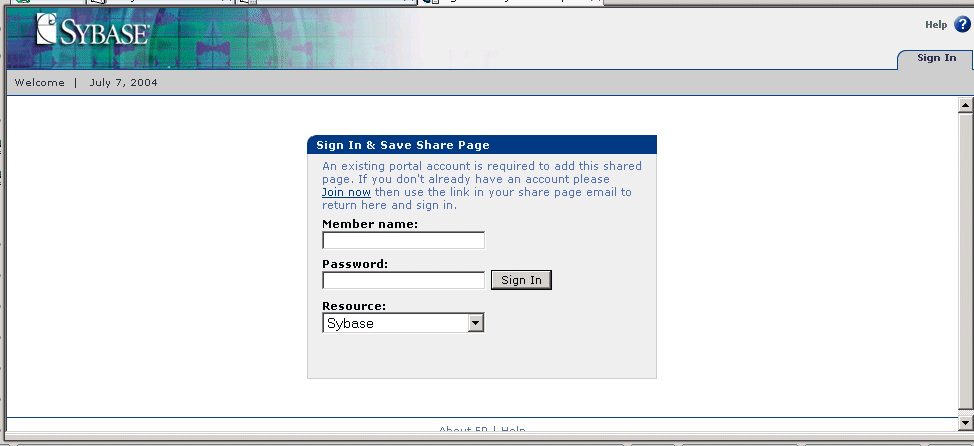
Click Sign In.
The shared page displays. You can click either:
Accept – the page is added to the shared page group.
Decline – if you decline the shared page, you return to your default portal page.
| Copyright © 2004. Sybase Inc. All rights reserved. |
|
|
