

To start the Administrator GUI, do one of the following:
Enter the following command at the operating system prompt:
administrator
 You must set the SYBASE environment before you invoke
the Sybase Replication Agent administrator utility. See “Setting the SYBASE environment” for more
information.
You must set the SYBASE environment before you invoke
the Sybase Replication Agent administrator utility. See “Setting the SYBASE environment” for more
information.
On Windows 2000 or 2003, double-click the file name administrator.bat in File Manager or Explorer.
This file is located in the RAX-12_6\bin subdirectory, in your installation directory.
When you start Administrator, the Sybase Replication Agent Administrator GUI window opens.
When you use the Administrator GUI it creates an output file in the $SYBASE/RAX-12_6/admin_logs directory. The format of the file name is adminmmddyyyy_hhmmss.log where mmddyyy and hhmmss are the current date and time.
Figure 2-2: Sybase Replication Agent Administrator GUI window
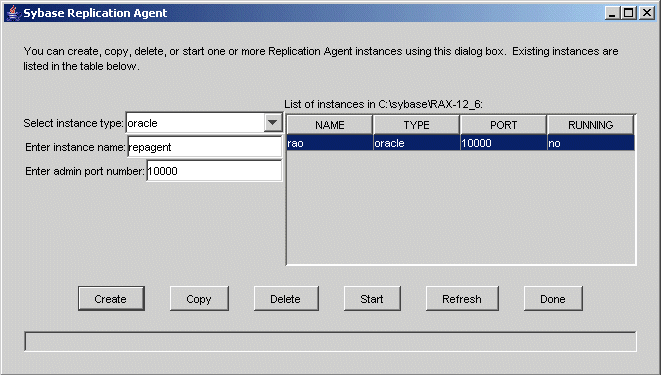
The Administrator GUI window provides the following information for each Replication Agent instance:
Name – Name of the instance
Type – Instance type
Port – Port number assigned to the instance
Running – Status of the instance (running or not)
Use the procedures in the following sections to administer Replication Agent instances with the Administrator GUI.
| Copyright © 2005. Sybase Inc. All rights reserved. |
|
|
