

Chapter 4 Repository Administration
A new user has no rights assigned by default. He belongs to the group PUBLIC that has no rights either.
The repository administrator has to define the rights of a new user.
 To grant rights to a user:
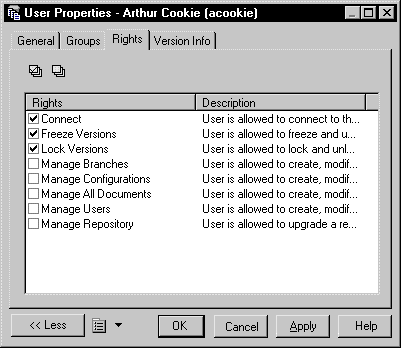
Each repository user has a set of rights that govern any kind of interaction with the database.
A repository administrator is responsible for granting the rights to the repository users and groups. The same types of rights can be assigned to groups and users.
The user rights are the following:
| Right | Description |
|---|---|
| Connect | User can connect to the repository. |
| Freeze Versions | User can freeze document versions. See "Document Versions" in the Working with Repository Documents chapter. |
| Lock Versions | User can lock document versions. See "Document Locks" in the Working with Repository Documents chapter. |
| Manage Branches | User can create, modify, and delete branches. See "Repository Branches" in the Working with Repository Documents chapter. |
| Manage Configurations | User can create, modify, and delete configurations. See "Repository Configurations" in the Working with Repository Documents chapter. |
| Manage All Documents | User can create, check in, check out, unlock, unfreeze, define permissions and delete any document version. |
| Manage Users | User can create, modify and delete repository users and groups, grant rights to users and groups, and add users or groups to a group. |
| Manage Repository | User can upgrade a repository and drop the repository database. |
The user rights can be combined to create different kinds of user profiles.
The following table shows typical project profiles. Note the difference between data administrator who manages data in the repository, and repository administrator who manages the repository and the users.
| User profile | Required user rights |
|---|---|
| Database Administrator | Connect, Manage Repository, and Manage Users |
| Data Administrator | Connect and Manage All Documents |
| Team Leader | Connect, Lock Versions, Freeze Versions, Manage Branches, and Manage Configurations. |
| Designer | Connect, Lock Versions, and Freeze Versions |
User rights can be associated with permissions on documents to define the actions a user can effectively perform on a document.
Some user rights are automatically associated with permissions for consistency reasons:
For more information on document permissions, see Controlling Permissions for Repository Items.
| Copyright (C) 2008. Sybase Inc. All rights reserved. |
| |