

Chapter 3 Working with Repository Documents
There are several options that control how you work with the repository.
 To define repository options:
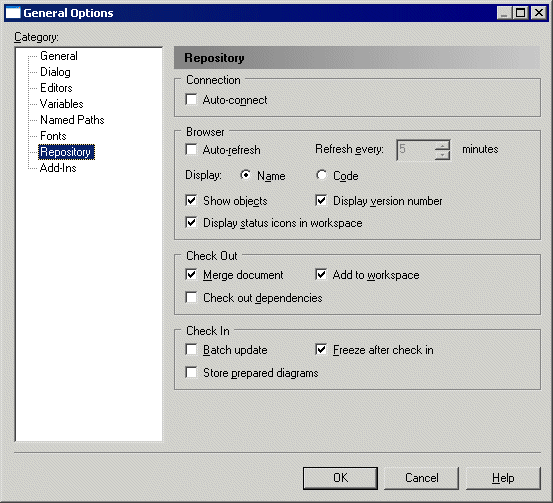
The following options are available in the Connection group box:
| Option | Description |
|---|---|
| Auto-connect | Automatically opens the last connected repository when you start a PowerDesigner session. |
The following options are available in the Browser group box:
| Option | Description |
|---|---|
| Auto-refresh | Refreshes the Repository tab of the Browser at the interval specified in the Refresh every box. |
| Display | Specifies whether the name or code of items is displayed in the Repository tab of the Browser. |
| Show objects | Specifies that PowerDesigner diagrams and objects are displayed in the Repository tab of the Browser. |
| Display version number | Specifies that the version number of documents and objects is displayed in the Repository tab of the Browser. |
| Display status icons in workspace | Specifies that the state of a local document versions (against those stored in the repository) is displayed in the Repository tab of the Browser. |
The following options are available in the Check Out group box:
| Option | Description |
|---|---|
| Merge document | Specifies that the Merge document check box in the Check Out window is selected by default. |
| Add to workspace | Specifies that the Add to workspace check box in the Check Out window is selected by default. |
| Check out dependencies | Specifies that the Check out dependencies check box in the Check Out dialog box is selected by default. |
The following options are available in the Check In group box:
| Option | Description |
|---|---|
| Batch update | Specifies that the Batch update check box in the check in options window is selected by default. |
| Freeze after check in | Specifies that the Freeze after check in check box in the Check In window is selected by default. |
| Store prepared diagrams | Specifies that the Store prepared diagrams check box in the Check In window is selected by default. |
| Copyright (C) 2008. Sybase Inc. All rights reserved. |
| |