

Chapter 3 Working with Repository Documents
Comparing Models in the Repository
You can compare two PowerDesigner models to obtain a detailed list of the differences between them.
You can compare:
- Two different models in the repository
- Two different versions of the same model in the repository
- One model on your local machine with another model in the repository
WARNING! Comparing models of the same type
You have to select models of the same type, PDM, OOM, etc. You cannot compare models of different types.
 To compare models:
- Press Ctrl+Alt+M, select Repository→Compare, or right-click a model in the Repository tab of the Browser, and select Compare.
The Select Models to Compare window opens:
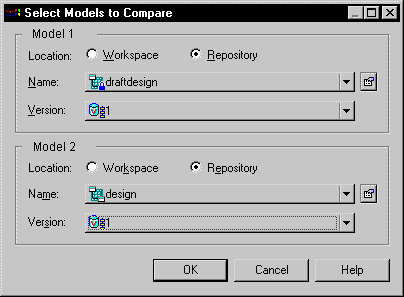
- For each of Model 1 and Model 2, select:
- A location to specify whether the model to compare is located in your local workspace or in the repository.
- The name of the model to compare – click the Properties tool to the right of the list to open the property sheet of the selected model. Select the same model in both lists if you want to compare different versions.
- The version of the model to compare – the most recent version is selected by default.
- Click OK to open the Compare Models window:
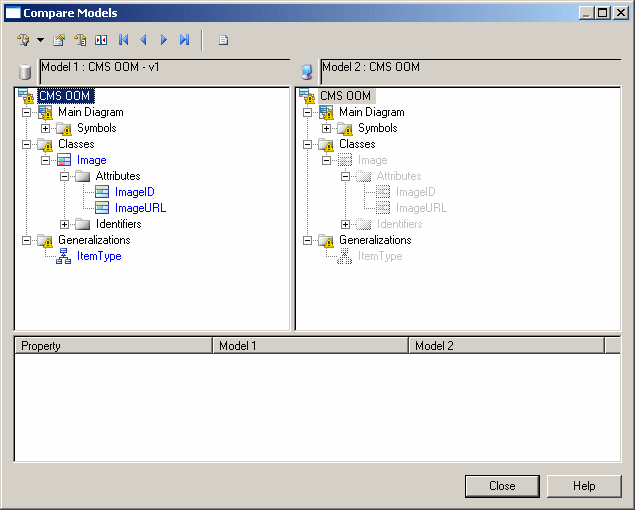
For full documentation of the Compare Models window, see the Comparing and Merging Models chapter in the Core Features Guide
.
|
Copyright (C) 2008. Sybase Inc. All rights reserved.
|
|