

Chapter 3 Working with Repository Documents
By default, when you check out a PowerDesigner model, all its packages on which you have Read, Write, or Full permissions are checked out with the model. Packages with List or no permissions cannot be checked out.
If you do not want to check out a complete model, you can select one or more packages to check out from the Select Packages dialog box, which displays the packages on which you have Read, Write, or Full permissions.
If you select a parent package, PowerDesigner automatically extends the selection to sub-packages. If you deselect some sub-packages in the package tree, the selection of the parent packages is grayed to indicate this. If you select a sub-package, PowerDesigner automatically extends the selection to parent packages to preserve the context of the sub-package.
| Action | Selection | Impact |
|---|---|---|
| Select modelingproject | 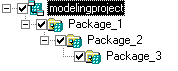
|
Package 1, 2, and 3 are automatically selected |
| Deselect Package 1 | 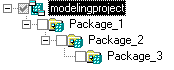
|
Package 2, and 3 are automatically deselected |
| Select Package 3 |
|
Package modelingproject, 1, and 2 are automatically selected |
| Deselect Package 3 | 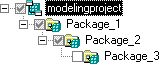
|
Selection check boxes in package modelingproject, 1, and 2 are grayed |
 Shortcuts in packages
When you check out a package containing shortcuts, the package selection is extended to include the target packages referenced by shortcuts even if you do not have the Read permission on these packages.
| Copyright (C) 2008. Sybase Inc. All rights reserved. |
| |