

Chapter 3 Working with Repository Documents
Integrate mode
The Integrate mode is always available in the check in window.
This mode should be used in the following situations:
- You want to integrate a document version into a different document - You have to define the project or (models and files only) the folder, name, and version of the document.
- You want to integrate a version of a document into another version of the same document that you cannot reach through Update/Branch mode - You have to select a version available in the base branch of the current branch.
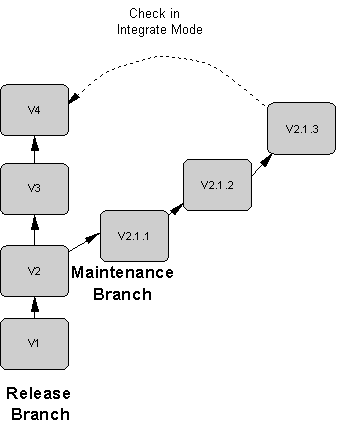
For example, a maintenance engineer working on a bug fix in the Maintenance branch wants to integrate this correction to the Release branch:
|
Copyright (C) 2008. Sybase Inc. All rights reserved.
|
|