

Chapter 5 Browsing the Repository via the Web
Setting permissions
You can change access permissions on an item from the Repository Web Browser.
 To add user or group permissions for a repository item:
- Click the object in the repository explorer to display its property sheet, and then click the Permissions tab.
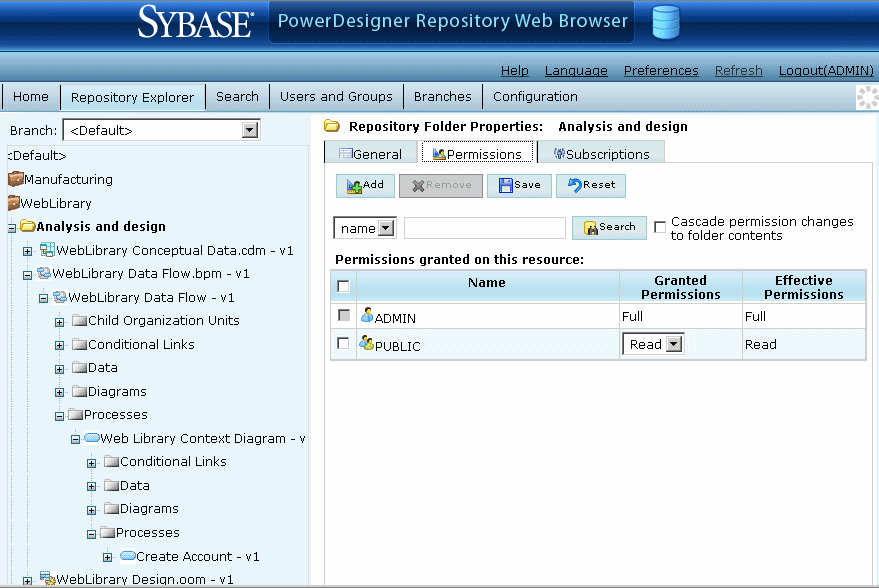
- Click the Add tool to open a selection box listing all the available users and groups.
- Select one or more users and groups, selecting the appropriate permission for each from the drop down list box in the Granted Permission column. The following permissions are available:
- List - User or group has minimal permissions to view the item in the browser; display read-only property sheets and search for models.
- Read - User or group has all the List permissions, and can also compare documents, and check the document (or folder contents) out from the repository.
- Write - User or group has all the Read permissions, and can also check in, freeze and lock document versions.
- Full - User or group has all the Write permissions, and can also manage permissions granted to users or groups and remove locks on documents.
Note that users who do not have any permissions on a document or folder cannot even see these items in the browser.
- [optional – for projects, folders, models] Select the Cascade permission changes to folder contents checkbox to cascade your changes to children of the node.
- Click the Save button to save your changes and return to the Permissions tab.
The Granted Permission column shows the permissions explicitly granted to groups and users, and Effective Permission column displays their actual permissions, the most extensive permission granted either explicitly or by way of membership in a group.
|
Copyright (C) 2008. Sybase Inc. All rights reserved.
|
|