

Chapter 5 Browsing the Repository via the Web
Logging into the Repository Web Browser
In order to log into the Repository Web Browser, you must have a repository user account, and obtain the appropriate address for the site from your administrator. Your administrator must also advise you if the repository you want to access is local or remote (in which case you must also know the name of the remote machine and the port to listen on).
 To log into the Repository Web Browser:
- In your web browser navigate to the web site address provided by your administrator (for example http://server
:3030/cmr):
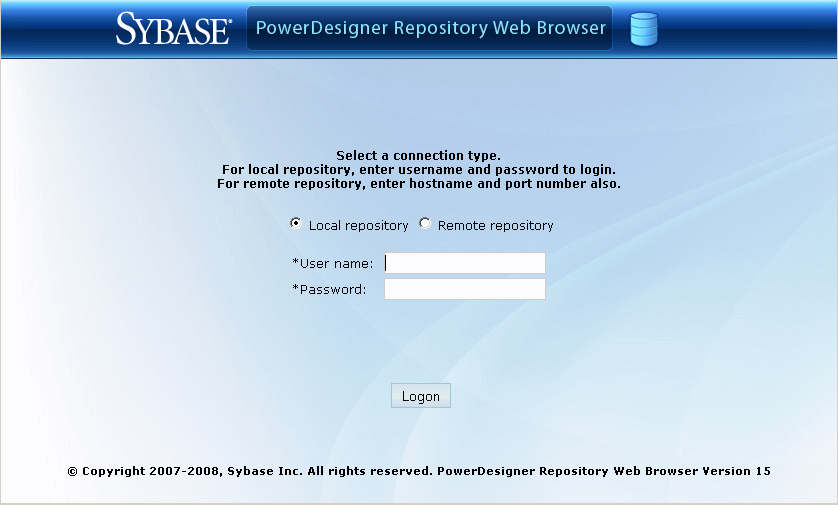
- Select whether you want to connect to a local repository (ie, one that resides on the same machine as the web server), or a remote repository.
- Enter your login information:
- User name – your repository user name
- Password – your repository password
- For a remote repository, enter the following, additional information:
- Host name – enter the name of the machine which hosts the repository
- HTTP port – enter the port number on which the web browser must listen. By default, this is 3030
- Enable SSL – select the checkbox if you want your communications to be encoded.
- Click Logon to go to the Repository Web Browser home page.
The following links are available in the top-right corner of the screen:
- Help – to access this help document
- Language – to change the interface language
- Preferences – to review your connection parameters and change your password
- Refresh – to refresh the display
- Logout - to logout
|
Copyright (C) 2008. Sybase Inc. All rights reserved.
|
|