The assign activity is used to update the values of variables with new data. An <assign> element can contain any number of elementary assignments, including <copy> assign elements (copy from-to).
Syntax
<assign name="AssignStockInfo" validate="no">
<copy>
<from variable="VOrderMessage"></from>
<to variable="VStockInfo" part="ItemCode"></to>
</copy>
<copy>
<from variable="VOrderMessage"></from>
<to variable="vOrderItemQte"></to>
</copy>
</assign>

Mapping
You design an assign activity in any of the following ways:
This type of activity triggers the display of the Assignments tab:
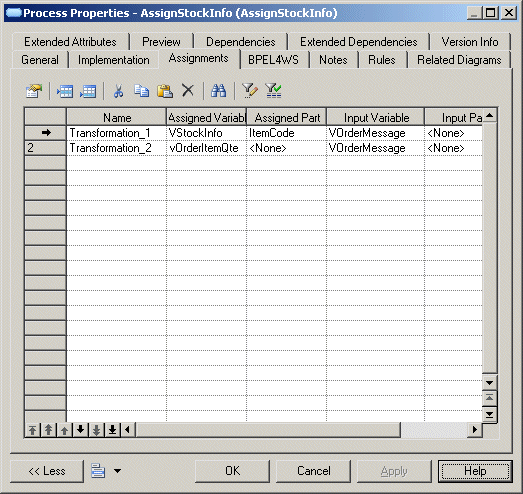
In the Assignments tab you then have to:
Extended Attributes
The following extended attribute applies to the assign activity and is available from the WSBPEL tab in its property sheet:
|
Name |
Internal code |
Description |
|---|---|---|
|
— |
expressionLanguage |
Specifies the expression language used in expressions |
|
— |
Validate |
When the value of this attribute is set to "yes", the assign activity validates all the variables being modified by the activity |
|
Multiple Correlation |
MultipleCorrelation |
Defines BPEL Invoke, Receive or Reply activities using several correlations. |
|
Join Condition |
joinCondition |
Join condition |
|
Suppress Join Failure |
suppressJoinFailure |
Avoids propagation of Join Failure exceptions |
Implicit Assignments
WS-BPEL 2.0 defines the concept of implicit assignments under messaging activities, such as Receive, Reply, Invoke, ReplyFault, OnMessage and OnEvent. An Assignments tab is automatically displayed in the property sheet of these activities when the "Support Implicit Assignment" setting is set to true in the process languages supporting these types of activities.