You design most activities using the process object.
Assign Activity
An assign activity is a set of elementary copy elements.
You design an assign activity using a process object with the "Assign" implementation type. This type triggers the display of the Assignments tab:
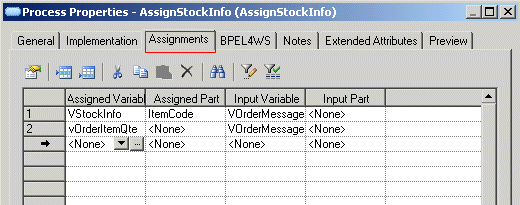
In the Assignments tab you then have to:
You can also easily create an assign activity using the Change to Assign command in the contextual menu of a process object.
Receive and Reply Activities
A receive activity with both input and output messages on the operation requires the specification of actions between the reception of the message and the emission of the response. You should convert the activity into a composite process to allow the specification of these actions.
Receive and reply activities are both designed using the PowerDesigner process object implemented by the same Request/Response operation:
While Activity
The while activity is designed using a process object with the Loop attribute selected in the Implementation page of its property sheet.
You must define a value in the Loop Expression box in the Implementation page of the process property sheet.
Throw, Wait and Compensate Activities
You design the throw, wait and compensate activities using a process object that generates an event with respectively a <<Fault>>, a <<Timer>> or a <<Compensation>> stereotype.
Switch and Pick Activities
Conditional branching is the specification of the divergence of several activity paths depending on certain conditions.
You design conditional branching instructions (switch and pick activities) using the decision object with the <<switch>> or the <<pick>> stereotype. All conditions on the outgoing flows must be of the same kind (exception or event) for the pick activity.
From a process or a start object with many output flows, you can use the Insert Switch command from their contextual menu to easily insert a switch activity.
The merge allows you to design the merge of the different conditional branching instructions. You design the merge using the decision object with the <<merge>> stereotype.
From a process or a end object with many input flows, you can use the Insert Merge command from their contextual menu to easily insert a merge.
Parallel Branching
Parallel branching is the specification of several activity paths in parallel.
You design the synchronization between these parallel paths using the synchronization object (for both split and merge of parallel paths) with the <<split>> or <<join>> stereotype.
From a process or a end object with many input flows, you can use the Insert Join command from their contextual menu to easily insert a join.
When parallel branches terminate in distinct ends, you must define a synchronization before the whole process ends.
The flow activity allows you to define parallel activities. You design a flow activity contained in a graph using a synchronization object with <<split>> and <<join>> stereotype. You can also use a composite process with a <<flow>> stereotype and design the flow activity within it for clarity purposes and the possibility to define extended attributes.
From a process or a start object with many output flows, you can use the Insert Flow command from their contextual menu to easily insert a flow activity.
Terminate Activity
You design the terminate activity using the end object with <<terminate>> stereotype.
The following extended attributes are available from the property sheet of the end object with <<terminate>> stereotype:
|
Name |
Internal code |
Description |
|---|---|---|
|
Join condition |
joinCondition |
Each activity has optional standard attributes: a name, a join condition, and an indicator whether a join fault should be suppressed if it occurs. A join condition is used to specify requirements about concurrent paths reaching at an activity. The default value of the join condition (for the default expression language XPath) is the logical OR of the link status of all incoming links of this activity |
|
Suppress join failure |
suppressJoinFailure |
Avoids propagation of Join Failure exceptions |
Flow, Scope and Sequence Activities
Flow and sequence activities are detected by the generation. However if you want to define specific extended attributes (such as joinCondition or suppressJoinFailure) on a sequence or a flow activity, you should create a composite process with a <<sequence>> or <<flow>> stereotype. Same, if a sequence or a flow activity is the source or the target of a link.
For more information on the link element, see Link.
You design a scope activity using a composite process with the <<scope>> stereotype, for clarity purpose, as the composite process is a scope by default.